GMA Logo instagram ideas for halloween
Celebrity Life

3 Creative ideas to spice up your Instagram this Halloween

By Cara Emmeline Garcia
Published October 27, 2020 4:59 PM PHT

Around GMA

Around GMA

OVP gets P889M after bicam approval
Dawn fire razes 7 houses in Estancia, Iloilo
Japanese lifestyle brand unveils limited edition 'Evangelion' merch collection

Article Inside Page


Showbiz News

instagram ideas for halloween


Much has definitely changed since the pandemic, but our love for Halloween is as strong as ever. Here's how you can deliver the spook to your co-workers and friends by using Instagram.

Halloween 2020 will be one to remember.

Due to the pandemic, many tried-and-true Halloween festivities, including trick-or-treating, crowded parties, and indoor haunted houses, are considered a risk for spreading the coronavirus.

And with COVID-19 continuously on the rise, many are wondering what's safe to do during Halloween.

Though some have resorted to continue with traditional trick-or-treating, others are on the hunt for safe Halloween alternatives.

If you're looking for a Halloween activity with the lowest risk possible, you've got to opt for something virtual.

Luckily, you can by utilizing things on your phone like Instagram or Snapchat so that you can still bring the horror in Halloween--It may be a little less treat, but the tricks are still there.

Here are some ideas to spice up your social media profiles for that spooky Halloween feel with a few ideas from Creative Director Karen Cheng:

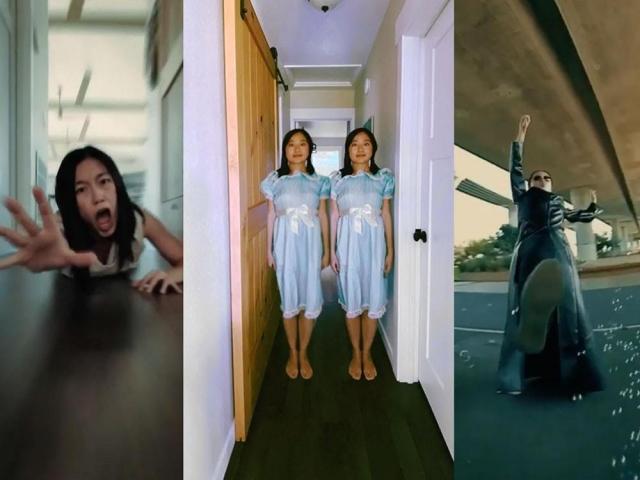
1. Do 'The Matrix'

🎥The original Matrix shot required 120 cameras. Here's my low budget version with 1 camera! I shot this with the @insta360 ONE R, it's a 360 camera and they have a “bullettime” feature that automatically stabilizes & edits this for you. However, I edited this one manually so I could adjust the FOV.  Credit to @nicovuignier who pioneered this idea back in 2016, he did this while skiing and made a custom aerodynamic rig for his camera. Since then the effect has become really popular with the @insta360 because it self-stabilizes and they have a setting that auto edits it for you.  I got the idea for the “bullet machine" when I saw a kid blowing bubbles in the park. Got plenty of weird stares when I was shooting this, but I'm used to that by now 😂  Director: @karenxcheng Camera: @insta360 ONE R Edited: with @insta360 ONE R + @adobevideo After Effects for speed ramping Music: “Sunny Days” by @stanleygurvich (pretty good for a stock track, huh? I got it from @artlist.io)  #filmmaking #vfx #matrix #wachowski #insta360 #insta360oner #keanureeves #lowbudgetfilmmaking #movies #cinematography #behindthescenes 

A post shared by Karen X (@karenxcheng) on

If you're a fan of early '90s movies, you've probably watched The Matrix and dreamed of looking cool like Neo (played by Keanu Reeves).

In the first movie, audiences saw Neo flawlessly dodging the bullets shot at him, making the trick one of the most iconic scenes in the sci-fi trilogy.

You can recreate the same shot by attaching your action camera to a string and using bubbles to serve as your bullets.

When editing, reduce the speed to make it look cool and epic for your viewers to see.

2. Recreate Hitchcock's iconic horror zoom

Part 2, playing with my toy truck 🚌 Sharing part 3 tomorrow!  🎥This effect has many names - Hitchcock zoom, dolly zoom, vertigo effect. It was first made by Alfred Hitchcock in 'Vertigo' and has since appeared in a bunch of movies. I've always been mesmerized by it! It's done by moving the camera away from the subject, at the same time as zooming in, all while keeping the subject the same size. Here I'm digitally zooming it in.  Works with any camera, even your phone. I recommend using the 4K setting if you have it because you'll need the highest resolution you can get if you're going to be digitally zooming in the footage afterwards. I posted a longer tutorial on my IG on April 28th which shows the editing flow.  Director: @karenxcheng Edited: with @adobevideo Premiere Pro to do the digital zooming Music: from @artlist.io “Mayhem” by Ian Post and "Alpha Theme" by Kyle Preston  #filmmaking #behindthescenes #hitchcock #dollyzoom #zolly #horror #insta360oner #cinematography #cameratrick 

A post shared by Karen X (@karenxcheng) on

Filmmaker Alfred Joseph Hitchcock is known as the “Master of Suspense” thanks to his “Hitcockian” shooting style.

He uses camera movements to mimic a person's gaze, thereby maximizing shots to produce a feeling of anxiety and fear.

The style is done by moving the camera away from the subject while zooming in, all while keeping the subject the same size.

To do this, attach your camera to a toy car and push it away from you.

Once you've captured your shot, you can digitally zoom it in using any editing software.

Et voila! A Hitchcockian style Instagram post perfect for Halloween.

3. Channel the Shining Twins

No photoshop knowledge needed, just use Snapchat's sticker tool👯‍♀️ Sharing part 5 next: Harry Potter!  Director: @karenxcheng #shotoniPhone and edited with Snapchat Music: from @artlist.io "Alpha Theme" by Kyle Preston  #clone #cloneeffect #theshining #stanleykubrick #vfx #lowbudgetfilmmaking 

A post shared by Karen X (@karenxcheng) on

Thinking of doing the Shining Twins for Halloween but don't know how to edit your photos in Photoshop?

Well, you're in luck because all you need is to download Snapchat and use the custom sticker tool so you can “copy and paste” your twin after taking a photograph in a spooky corridor.

BONUS: Borrow Harry Potter's Invisibility Cloak

How to hide from your boss on Zoom 🙈 Here's how to do it on your next Zoom call: 1. Take a picture of your room with your webcam (without you in it) 2. Use @zoom virtual background and set the virtual background to the picture of your room. Make sure you keep your computer webcam in the exact same position. 3. Toggle on the "I have a green screen" and then set it to the color of your blanket. A green blanket works best, but any distinct bright color blanket should work. 4. Disappear yourself!  Note: depending on the lighting, you might notice some artifacts along the very edges of your blanket. This is hard to avoid in a live Zoom meeting call, as it's a limitation of the live green screen feature. In this video example, I made the edges disappear at the very end by editing and merging it with the virtual background image using Premiere  #harrypotter #invisibilitycloak #zoomhacks #filmmaking #cameratrick #zoom 

A post shared by Karen X (@karenxcheng) on

Your boss planned on having a Zoom conference meeting on Halloween?

Well, here's a creative way you can spice up that Zoom call.

First, take a photo of your room with your webcam without you in it, and upload it on Zoom as a virtual background.

In the program, toggle on the “I have a green screen” button and then set it to your blanket's color.

Finally, wait for your co-workers to see you disappear right before their eyes!

Much has definitely changed, but our love for Halloween is as strong as ever.

Surprise your friends, families, or even followers by trying these one-of-a-kind tricks for the upcoming celebration.

Need more Halloween ideas? Try going to GMA Network's Lifestyle Page for recipes, costume ideas, and so much more!