

Twitter launches voice tweets feature on iOS
Around GMA
Around GMA
Balitanghali Livestream: January 2, 2026 YEARENDER: Calamities that hit W. Visayas, NegOcc in 2025 Heart Evangelista teases new project on social mediaArticle Inside Page
Showbiz News
You can now literally voice your opinions on Twitter with its new feature. Learn how to record voice tweets HERE:
Twitter has rolled out its newest feature, which lets you upload recorded audio: voice tweets!
 You can now record your voice and tweet it | Source: Pexels
To post a voice tweet, open the Tweet composer and tap the new wavelengths icon. A record button will appear on the bottom of your profile pic. Tap that record button to record your voice.
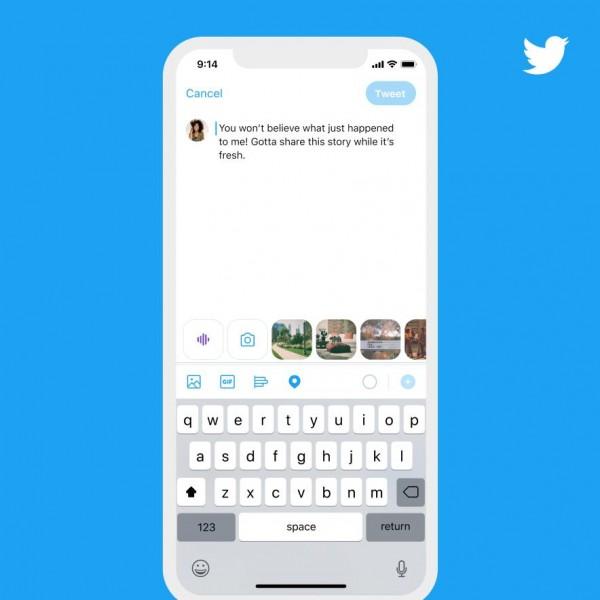
How to record a voice tweet | Source: Twitter
Each voice tweet will capture 140-second audio. If you want to record something longer than that, just keep talking, as it will continue to record even when you reach the time limit. A thread will then automatically be created. Once you tap the 'Done' button, the recording will end and you'll be led back to the composer screen to finish your tweet.
 What recording voice tweets looks like on your screen | Source: Twitter
Initially, the voice tweets feature will only be available to a limited group of iOS users, but in the weeks to come, everyone on iOS will be able to use it. And if you're not using iOS, you can still play and reply to voice tweets.
IN PHOTOS: LJ Reyes launches her smart phone app "MApp" for iOS
Twitter has been the favorite social media platform for voicing opinions and engaging in public discussions since its establishment in 2006.
#ProtectVico trends anew as Pasig City Mayor Vico Sotto gets summoned by NBI
And it is also the birthplace of the hashtag, which reshaped the way people share posts on social media forever.
By adding the voice tweets feature, Twitter hopes to create a more human experience for those sharing and listening to it.
If you want a sample of it, here's Twitter's first voice tweet. Take a listen.
Tweets with audio are rolling out on iOS and we only have one thing to say about it pic.twitter.com/CZvQC1fo1W
-- Twitter (@Twitter) June 17, 2020
For more lifestyle content, head out to GMA's Lifestyle page.
RELATED CONTENT:
Twitter CEO Jack Dorsey to donate US$1 Billion to COVID-19 relief efforts
'The Atom Araullo Specials: COVID-19: Nang Tumigil Ang Mundo' tops Twitter PH trending list
Twitter launches special emojis for 'Descendants of The Sun Ph'
