

 GMA Brandtalk
 Tracking
 Archives

ADVERTISEMENT
Filtered By: Hashtag
Hashtag
'We made trending topic!' Twitter #hashtags 101
+
Make this your preferred source to get more updates from this publisher on Google.
Twitter seems designed for the chatty, free-for-all culture of Filipinos. And the metrics show it. Even in the old days of 2010, before a Twitter presence became obligatory for anyone not in a cocoon, Filipinos already ranked sixth in the world, according to a ComScore study. And that may not have even included overseas Filipinos. With numbers can come power and influence. On Twitter, one exquisite device that has evolved to express critical mass is the "hashtag." 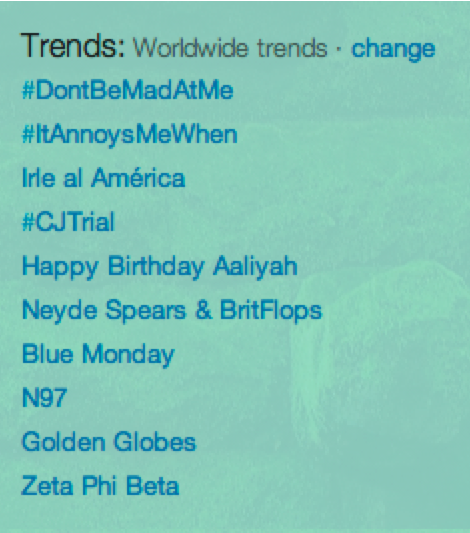 # + key word(s) = hashtag, e.g. #CJTrial During big news events like the Corona impeachment trial, individuals and organizations use hashtags in their tweets to help users search related tweets, which when re-tweeted by others with the same hashtag can create a snowball effect called a "trending topic." That basically reflects popularity of the hashtag, suggests public interest in the subject, and gives the creators of the hashtag bragging rights.
# + key word(s) = hashtag, e.g. #CJTrial During big news events like the Corona impeachment trial, individuals and organizations use hashtags in their tweets to help users search related tweets, which when re-tweeted by others with the same hashtag can create a snowball effect called a "trending topic." That basically reflects popularity of the hashtag, suggests public interest in the subject, and gives the creators of the hashtag bragging rights. But that's just one use of the hashtag. Here's a rundown of its various functions: Update yourself.  WHY: Help yourself find interesting tweets and keep pace with what’s happening around the world, both trivial and vital. HOW: Check your home page for the top ten trending topics on Twitter worldwide or in 31 other countries. Clicking on the trending topic that piques your interest the most sends you to a stream of Twitter users tweeting about that topic. From there, you can observe and read what they all have to say. Create and/or join conversations.
WHY: Help yourself find interesting tweets and keep pace with what’s happening around the world, both trivial and vital. HOW: Check your home page for the top ten trending topics on Twitter worldwide or in 31 other countries. Clicking on the trending topic that piques your interest the most sends you to a stream of Twitter users tweeting about that topic. From there, you can observe and read what they all have to say. Create and/or join conversations.  WHY: If you have nothing better to do, improve your social skills with Twitter! If you feel so strongly about commenting on a particular idea being discussed, do so. Create meaningful conversations and connections!
 HOW: Use Twitter to search and find other Twitter users using the keyword in mind. Once you have found them, merrily exchange tweets. (Note that you will not be able to see tweets from Twitter users with locked accounts that you are not following.) Promote or Trend  WHY: Do you want your brand, a cause, or a personality you like to become better known?
HOW: In your tweet, insert a hashtag or any keyword in mind. Encourage all of your followers to help you by posting tweets related to your hashtag. A hashtag or topic will trend if a good number of Twitter users frequently use any keyword or topic in your tweets. WHY: Do you want your brand, a cause, or a personality you like to become better known? Leave a side note.  WHY: It’s fun! In a way, this forces you to come up with something witty - a good exercise for the brain. HOW: The tweet begins with any of the following: an event, an emotion, a statement, an action, or practically anything that might merit a quip and is then followed by the hashtag. Organize your tweets.
WHY: It’s fun! In a way, this forces you to come up with something witty - a good exercise for the brain. HOW: The tweet begins with any of the following: an event, an emotion, a statement, an action, or practically anything that might merit a quip and is then followed by the hashtag. Organize your tweets.  WHY: This is recommended for Twitter users who regularly tweet about a wide variety of topics. HOW: Insert the hashtag or the keyword you want at the end or at the beginning of your tweet. If you’re tweeting a photo, a video or a link to your blog, you can write ‘Photo’, ‘Video’ or ‘Blog’ at the start of your tweet. Make your tweet special with a unique hashtag.
 Twitter is a social network. Hashtags allow users from different walks of life to interact about subjects of mutual interest, one of the joyous functions of the Internet that has morphed into this exciting new form. Always remember to "think before you click" - #thinkb4uclick. Make sure that the topic you’re talking about with fellow tweeps is not defamatory and remember to always use appropriate language. Use social media responsibly. — HS/TJD, GMA News

